

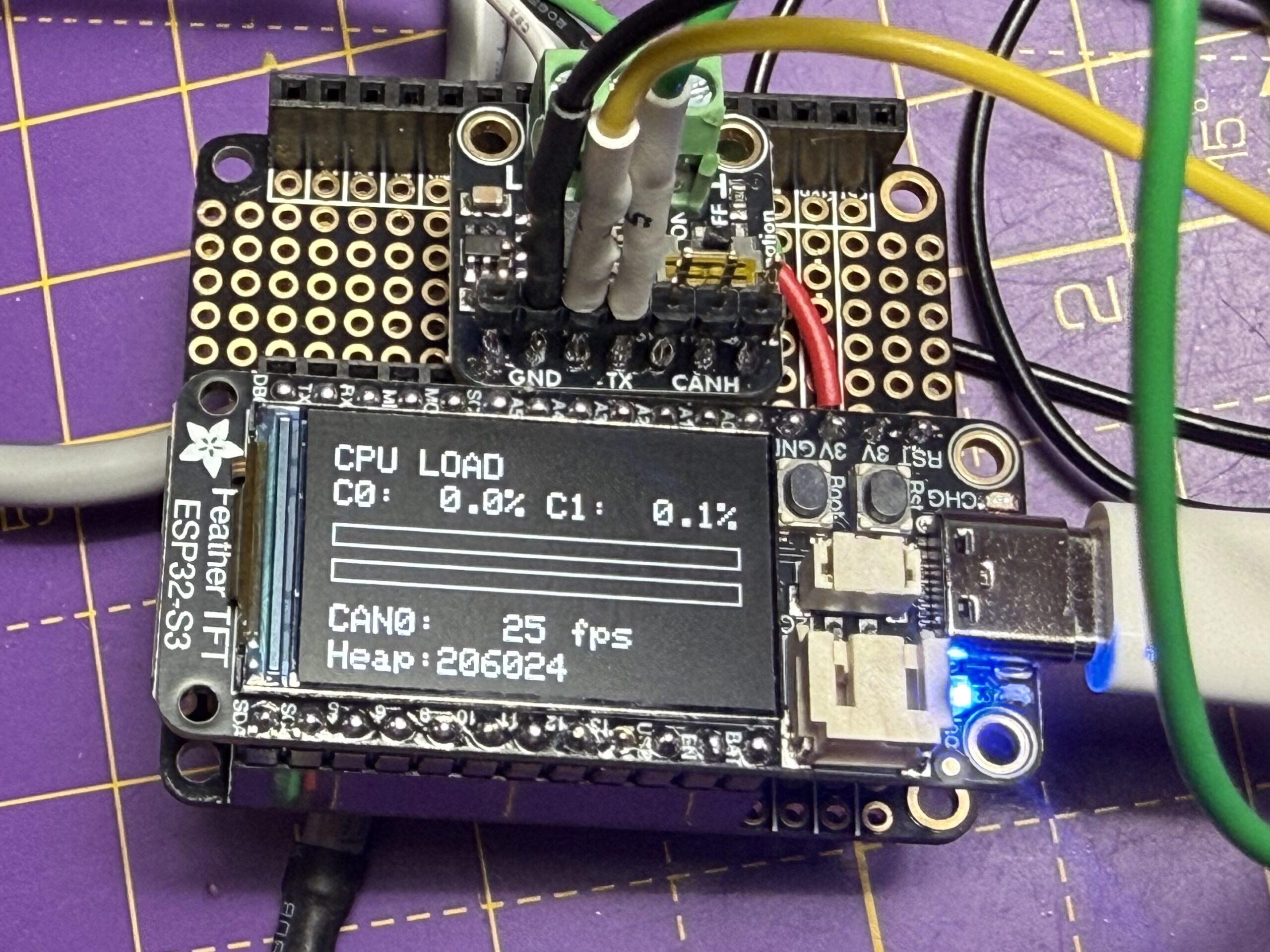
Well, this was another one of those rabbit hole projects. I’d got myself a home grown CANbus sniffer that talked in the Lawicel format to SavvyCan and allowed me to sniff CANbus data reasonably reliably.
BUT, I had to be connected to the sniffer over a serial interface and that was becoming a problem in my crowded office/lab environment. My current sniffer was also running out of steam (there’s a mental image) and so I needed more grunt too.
I also want my Sniffers to have a locally attached display on them… it’s good to be able to see how many packets are flowing and to be able to have a semi-intelligent sniffer showing other things locally without having to have a PC connected to them. An attached display is also great for some quick diagnostics when things aren’t going the way you thought they would.
So I decided to see if I could get the ESP32RET project (wifi streaming of CAN frames over WiFi) running on an Adafruit ESP32-S3 TFT board… what could possibly go wrong!
And before we get too far into this… here’s the GitHub repo for anyone who doesn’t want to read any further… don’t blame you TBH!
https://github.com/Purplemeanie/ESP32RET.git
The OG CANBus Sniffer
But before we get into the ESP32RET project… here’s what I’d done already. A couple of CANBus projects, one a packet generator and one a sniffer. Both based around the Adafruit RP2040 CAN Feather – I really like these boards!
I worked for a few months with these devices sniffing the various CANBuses I was playing with.
The Sniffer gets connected to a PC (Mac) and was controlled by the SavvyCan software using a Lawicel/SLCAN protocol. All was fine, but it did need a serial connection and topped out at about 800 packets/sec.
Here’s the two projects connected together, being tested back to back.
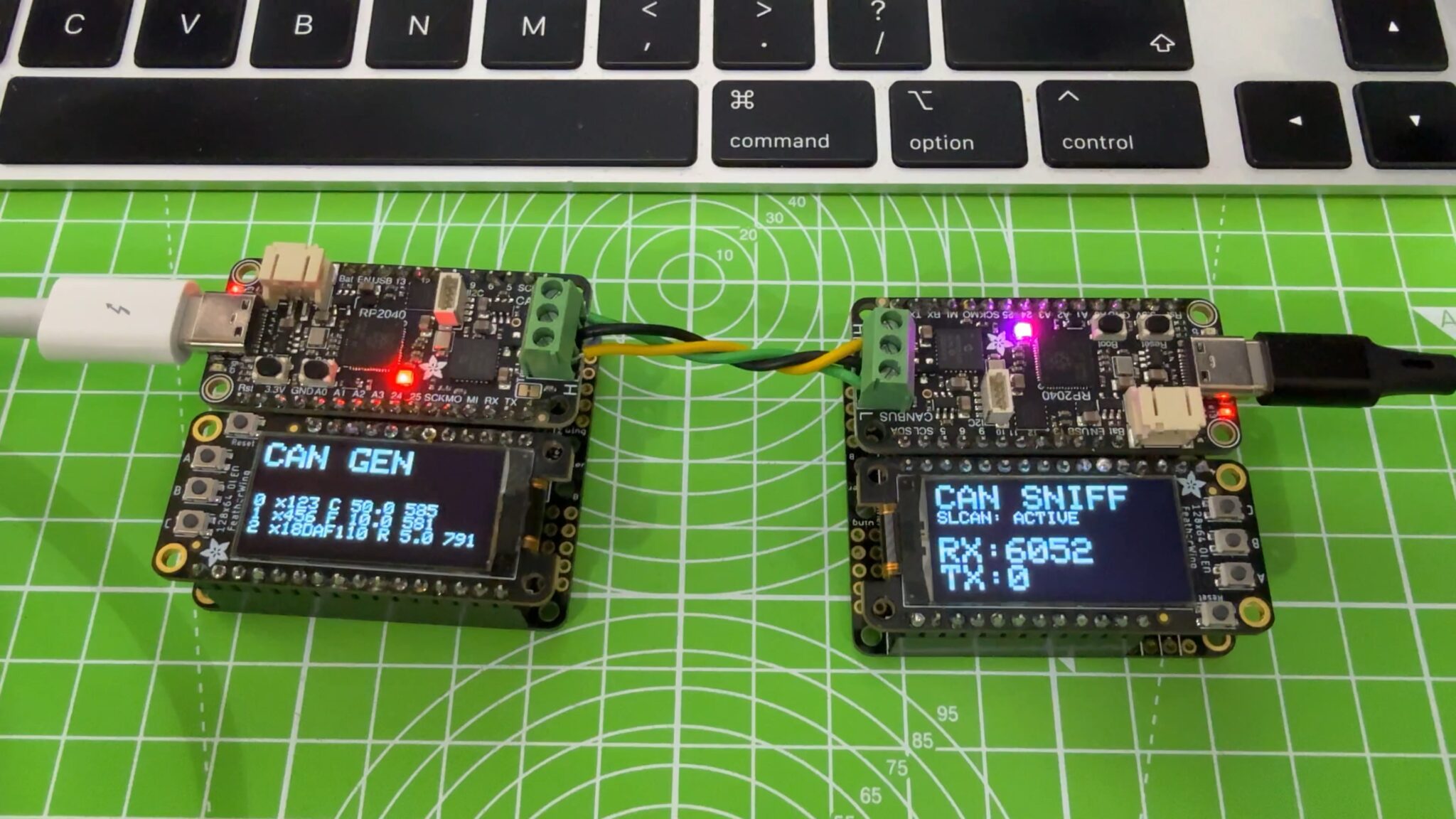
As you can see the displays are really useful.
The generator also had a “command over serial” interface. So, via the serial interface to my Mac, I could turn on and off any of 4 different frame generation patterns, with data length, data content (fixed, count, random) and frequency all configurable. It’s been really useful at loading up a bus to see what breaks.
The sniffer was also really useful, getting me through the early stages of my test bench setup… setting up the VCU, PDM, DCDC and BMS (if you know you know).
Anyway back to the main topic… ESP32RET on ESP32-S3.
Why ESPRET on ESP32-S3
… because I over-engineer stuff… that should be obvious by now.
I’d seen the ESP32RET project being used by other automotive peeps and it looked cool, but I had my RP2040 based boards and that was enough to be going on with.
But, with the Lawicel ascii CAN-frame over serial protocol that SavvyCan uses and fact that my boards needed to be tethered to a serial port, these things started to become problems.
My Brusa DCDC converter generates over 600 CAN packets a second just doing nothing, and I was only getting about 800 frames/sec between my Generator and Sniffer. So that could be a bottle neck.
And… I was having to drape a 3m USB3 cable across my office so I could connect my desktop Mac to my Sniffer boards. That wasn’t ideal.
So I thought I’d have a look at getting the ESP32RET project running.
ESP32RET
This is a very cool project, here: https://github.com/collin80/ESP32RET.git
It runs on an ESP32 (so already pretty powerful) and can do a bunch of stuff, including:
- Serial command and control interface (enable/disable can busses, set speed, listen only etc etc)
- Binary CAN over serial and Wifi (TCP)
- Ascii CAN over serial
- Some CAN Lawicel protocol support (not tested).
I was mainly interested in the CAN over Wifi. This particular mode uses a fairly simple wrapper around the CANbus frames, with the protocol being known as GVRET:
- 0xF1 as a framer,
- a command byte,
- CAN-ID,
- data size,
- bus,
- data
- and a CRC (not currently used).
Note: there’s some packing of data into single bytes, so don’t take that list a the data structure.
That all looked pretty simple and snappy and comes with the benefit that SavvyCan not only works with it, but also auto discovers GVRET endpoints on a network.
All good so far.
ESP32-S3
Now in my ignorance of a new project, and for that matter a new processor I really didn’t appreciate what I was getting into… yes, yes, I know everyone and their dog has worked with ESP32’s but I’d only done a little bit of work on the Adafruit Hazah boards quite a few years ago and so I wasn’t up to speed with just how different ESP32 processors can be.
But in my haste I had a look around at the ESP32 processor boards that were being sold and found the Adafruit ESP32-S3 TFT. And I’m a big fan of Lada Ada’s Adarfruit stuff so I ordered a board, and the Adafruit CAN Pal that I’d need to connect it to a CANbus.
And there my journey began.
Getting the ESP32RET onto the Adafruit ESP32-S3 TFT Board
All was well at the start. And I probably should have done more research on ESP32-S3 running ESP32RET (there are other forks of ESP32RET – but none for the Adafruit board I don’t think).
The ESP32RET project comes with a well put together platformio.ini file that I now knew how to use (having spent way too much time on the esp8266-web-server project trying to get familiar with PlatformIO).
So a few clicks later and I had my Adafruit S3 TFT board connected to the CAN Pal and loaded with the ESP32RET code.
First job was to test it all out, and so I obviously connected it to my RP2040 CAN Generator from above and stuffed it’s output into the S3 board.
And all was well and good… CAN frames were generated, captured on the S3 and I was able to connect to the Wifi of the S3 using Savvy Can. Even connecting it to my home Wifi network was trivial.
Then the problems began.
Next up I connected this new ESP32RET S3 sniffer to my EV test bench. At the time of writing this the test bench just comprises the ZombieVerter VCU, an AIM Tech PDM32, a Brusa BDC668 DCDC converter and an EMUS G1 BMS. So just 4 devices on a CANbus.
And it didn’t work.
The ESP32RET code just started to reboot, time after time. Ooops!
Debugging ESP32RET on ESP32-S3
Bugger! I was hoping this was going to be a trivial install.
It turned into almost a week of head scratching, ChatGPT sessions and tweaking just when I thought it was all working… but wasn’t.
It took almost two days to get my head around what was going on. I had to add a bunch of code to the ESP32RET project to see what was happening. I added some code to show me why the rebooting was happening (it was PANIC’ing… as suspected) and a lot more code to try and binary cut where the panic was hitting.
I then got into coredumps. Thankfully the ESP32RET project is well set up, and it already created a flash partition for a 64kB coredump. It took an hour or two to get the exact incantation to extract and decode the coredump, but eventually ChatGPT and I got there.
And of course, as of early 2026 it goes without saying that ChatGPT massively increases the speed that you can iterate these problems. I know all the stuff about coredumps and panics and multi-threading and locking… I’ve been doing multi-threaded projects for over 35 years. But on a new processor and development environment I would have spent days researching what tools to use and the various command line options. I knew the route that needed to be taken but ChatGPT carried me down the road SO MUCH FASTER than I would have done with just Google searches.
And the coredump was telling us that we were getting code being called as null pointers. I.e the object being referenced had dissapeared behind the calling environment’s back. That wasn’t a surprise.
But that led to another couple of days of trying to figure out where that was happening in the four different projects that ESP32RET is made from.
In the end we got there. There may be other such problems in the code base, but the one that fixed my particular panic was around the enabling and disabling of CANbuses. As the board boots it obviously starts up the CANbuses. But it also bounces the busses a couple of times to do stuff like set baudrates and listenonly modes. And as the bus was bounced it was trying to set up two different ISR callback routines for each bounce, as well as set up a bunch of queues etc.
And the task creating and teardown was racing the bus bouncing.
So between ChatGPT and myself we added a bunch of mutexes around the enable() and disable() functions (that create the tasks) and also around the higher level set baudrate and listenonly functions. It was also obvious to not do the enable()/disable() dance if the baudrate or listen mode weren’t actually changing.
We also added a bunch of fallback code in the enable() code. Probably not particularly useful in this context. i.e. If the CANbus doesn’t get set up correctly then we’ve got a bigger problem than whether we survive that attempt. Anyway we added it.
So, after a few days I had a running ESP32RET project on an Adafruit S3 TFT board.
Some Graphics
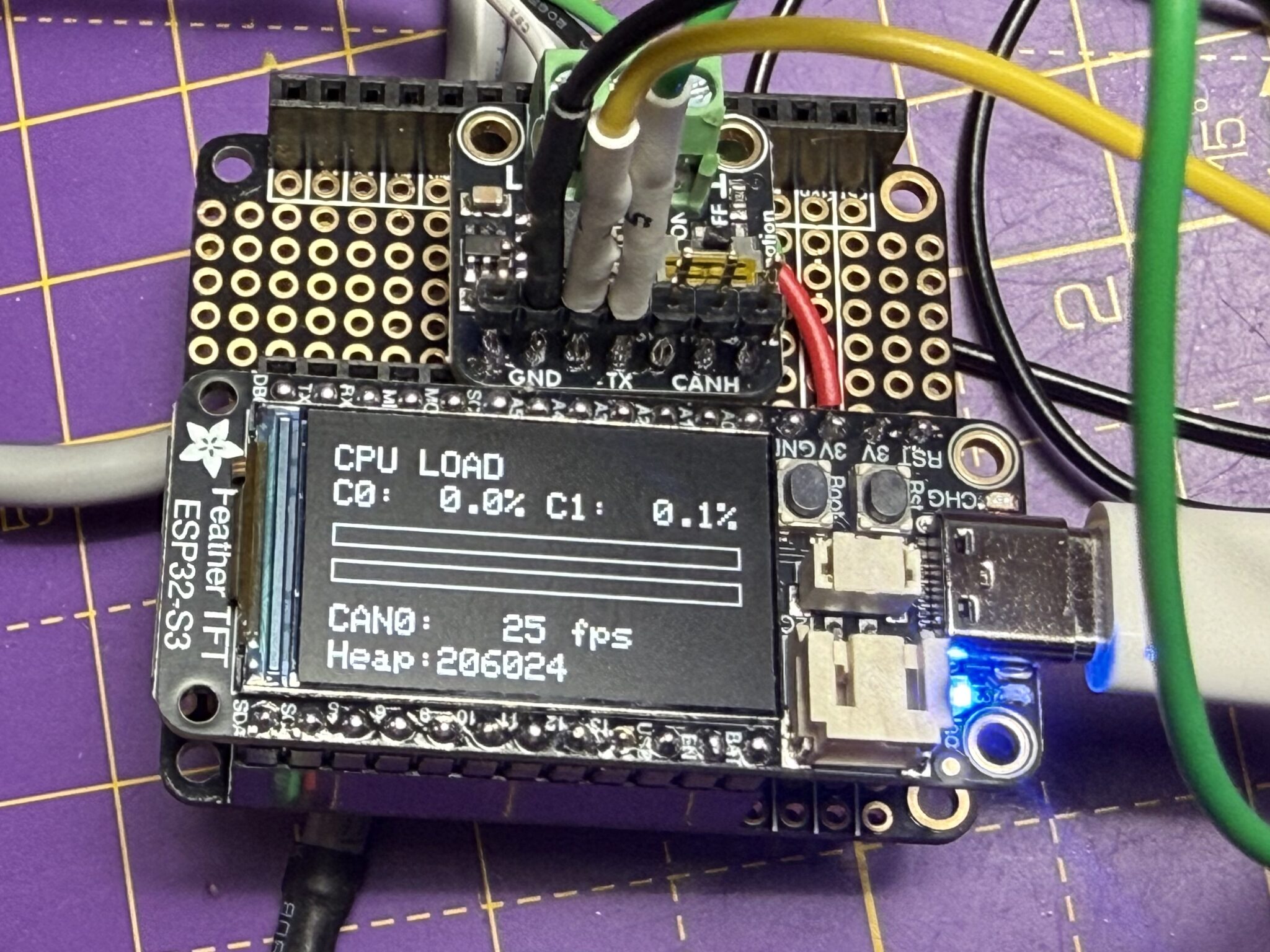
And that just left some graphics to get displayed on the TFT. I’d left that well alone while the board was panic’ing… I didn’t want to be making that worse by introducing another bus (SPI) and some timing changes.
But once the board was stable it was trivial to get ChatGPT to write the code to create some graphical stuff on the TFT. There’s more to come on this, but this is really useful at the moment:
- CPU loading of the two cores
- CAN frame rate (fps)
- Heap usage
As it happens the cores are both pretty underutilised – even at about 700 frames/sec on the CANbus.
Side Note: As part of the debugging, I’d also made sure I wasn’t running the various tasks and main Arduino stack on different cores… without the mutex protections I eventually put in anyway, running on multiple cores could certainly be causing my panics.
But in the end, as I write, I have all the code (including graphics) and IRSs running on just one core, it barely registers.
And that’s it, ESP32RET on an Adafruit S3 TFT sniffing packets from my EV test bench into SavvyCan. Now wouldn’t it be nice to have a (better/different) way of analysing these packets… ohh.. you’d like another rabbit hole into Wireshark plugins would you… well have I got a post for you.
Happy Blatting. J

Leave a Comment